Hey, works on my machine! Doh! This is what I murmured at my machine last Saturday as I *quickly* applied some technical house-cleaning on a small side project. Not so fast….
OK, so I had this project for a client that *started* out with one or two pages that needed to add items to a shopping cart whose state was on the server in a session. Simple. So, a simple ajax approach was in order, using asp.net’s support for generating a simple client-site proxy which sits on top of their [client-side] network stack [which sits on top of xmlhttprequest]. I opted for the ever-simple (and surprisingly unknown) web method approach, and dropped a few[WebMethod] attributes on each method in the each page’s code-behind. Voila, insta-ajax. For a small project such as this, a simple and pragmatic approach. I enable PageMethods on my ScriptManager:
<asp:ScriptManager ID=”ScriptManager1″ runat=”server” EnablePageMethods=”True”></asp:ScriptManager>
I also have my simple business entity that will flow over the wire [ala JSON] as such:
[Serializable()]
[DataContract]
public class ShoppingCartItem
{
[DataMember]
public int ID{ get; set; }
[DataMember]
public string Name{ get; set; }
[DataMember]
public string Description{ get; set; }
}
With the web method and script manager, the lovely javascript proxy does its magic on the client for a nice clean “typed” ajax experience (flows over the wire in JSON format). On the client I simply have a call to PageMethods.MyServerSideWebMethodNameHere(shoppingCartItemArray,onSuccessJavascriptCallback,onOopsJavascriptCallback), and all is good.
Fast forward a few months and change request #1 comes along, with sufficient argument for *more* pages. Hm…my solution of page methods looks less sassy as “page method x Number of pages=yuck”. Eek, starting to get pretty lame, even if the WebMethods are one-liners into a session-backed shopping cart. This is a really small app, and I’m tossing out low estimates, so in the sake of billable time, i rock out a few more copy/paste WebMethods, but riddled with guilt by now.
A few more months pass before request #2 is in. OK, enough is enough. We all know there are zillions of ways to send json or angle bracket requests over the wire via ajax, so I decide its time for a handler, and WCF really is the recommended approach for Microsoft’s network stack ambitions. In about 10 minutes, I move my [shamefully redundant] code from [one of my] WebMethods, plop it into the WCF service class. I change my client-side calls from “PageMethods.blah….” to “[wcf server namespace].[wcs service name].blah….” and we’re cooking with gas in no time. Oh, I also made sure my script manager referenced the wcf service and disabled page methods. Shame on me, I should have done this for request #1 months back…
I wrap up my changes, and toss the code onto the client’s server and WCF turns into the devil. First stop, “WCF: This collection already contains an address with scheme http” message. One quick hit to Bing Google yields a few hits, including this dude’s solution. Basically, you have to remember, that WCF is steeped in theory of being agnostic of its host, and as such, when a specific host, like IIS in this case, barfs up several base addresses, WCF doesn’t know what the heck to do. So, that article’s solution is fine, except, I changed it slightly to have a configurable host name that we look up with a very simple linq-to-object query (I’m sure there are other ways to do this too, so don’t just take these solutions at face-value if you have a larger problem to solve):
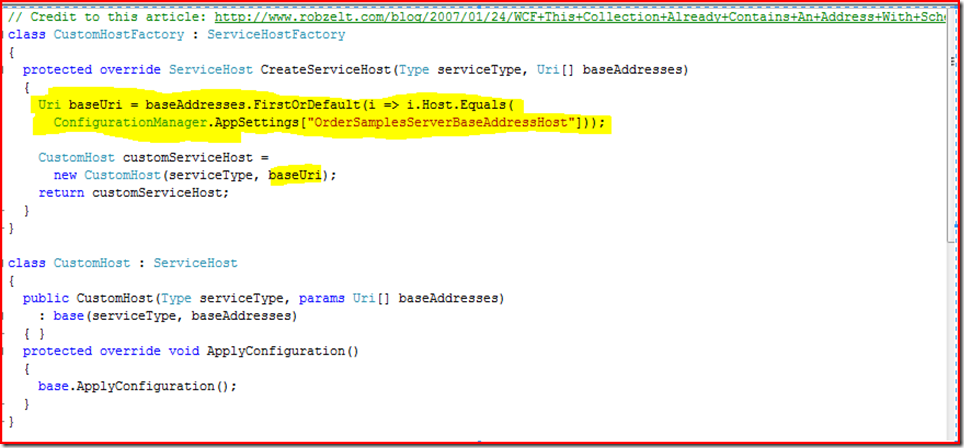
For my machine, that app setting was the name of my machine, while on the production machine it was something like “foo.com”. Not pulling ordinally as the article suggests shields from changing host header information in the iis metabase and makes the code more durable. The next issue was with the client failing with an HTTP 404 (I used the ever-awesome FireFox javascript debugger “Firebug” to look further…highly recommend it). I decided to make sure I could ping the service. Yep, no problem. Then i pinged the service with the /js switch, which the client-side code will use to snag a client-side proxy to talk to the service. DOH! No dice. Hey, this worked on my machine! 30 seconds of googling yields one article describing the issue, and it appears related to Sharepoint being installed, yadda yadda. At this point, I was essentially eating this time from a client-servicing standpoint after no quick resolution via that article, so I simply pulled down the proxy for my 1-method client wrapper, and replaced my service reference in the script manager with the javascript proxy instead:
<asp:ScriptManager ID=”ScriptManager1″ runat=”server”>
<scripts>
<asp:ScriptReference Path=”~/OrderSamplesProxy.js” />
</scripts>
</asp:ScriptManager>
I tweaked the output of that proxy javascript to make sure the path to the .svc file was properly relative. After that, i was good to go. Not quite ten minutes, but now I’ve taken a few WCF bruises, but the code is better, and the [ajax] world seems right. Really at some point, i need to circle back and fully address the /js issue. I was very hesitant to get too experimental since the client’s test server *is* the production server as well, with Sharepoint happily consuming chugging along on it.
Perhaps you’ve encountered such things or may find this useful.


 Jason Harper's nerd rant