Use Powershell and Slickrun to display w3wp info

If you have multiple pools running within IIS locally, you’ll see corresponding w3wp.exe processes in visual studio when you try to attach for debugging purposes.  One quick way to figure out *which* one is the w3wp that you need to attach to is to display the process id and application pool for all the w3wp processes on your machine.  There’s plenty of old-school way to do that, or you can use a powershell script such as this:

gwmi win32_process -filter “name=’w3wp.exe'” | format-table -autosize name,processId,commandLine

So, you could pop that into a powershell file and call that either via an old-school batch file – or….. you could use a command line utility such as SlickRun and in-line the command into a “MagicWord” (Slickrun-speak for a named command) like this:
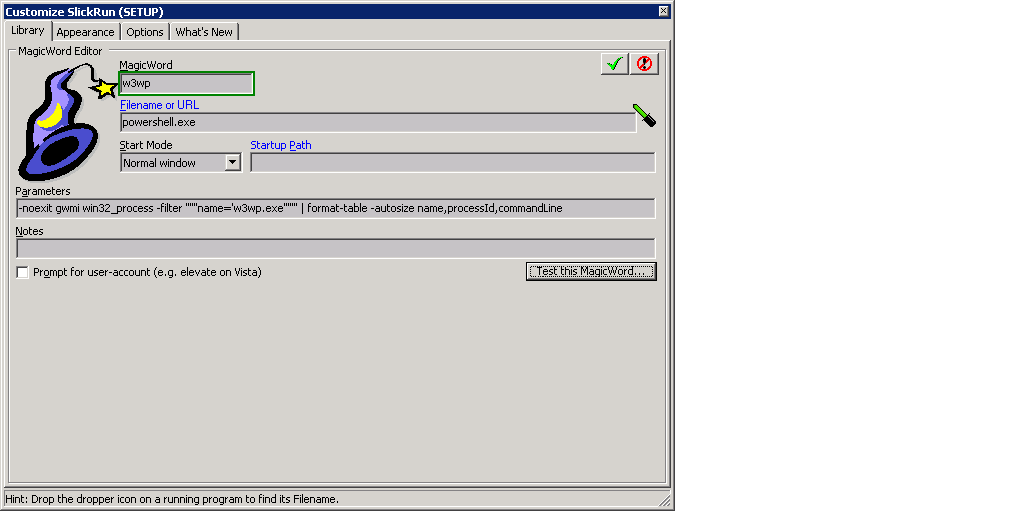
magic.


Of  course, this is pretty simple too: http://www.ervinter.com/2009/04/23/get-process-id-from-multiple-application-pool-iisapp/

Couple great tools for JavaScript and regex…

If you are whipping up some JavaScript and want a great place to build/run and perhaps share with other, then you need to check out JSFiddle.  This tool is fantastic, and a great way to collaboratively work on JavaScript.  For debugging and/or writing out to a console, consider using Firefox’s [awesome] firebug addin (IE Developer tools works pretty well too).

For times when you need to use regular expressions – and you’re either not strong at them, or have been away from them for more than 2 minutes (the time it takes to forget most of the syntax), then check out RegExPal.  This little utility is handy, and give great real-time visual indications of matches.

Mocking with Moq and Moles

I had the pleasure recently to do some unit testing work for some foundational classes (not, not TDD, but still…) and decided to quit stubbing and start Mocking.  One of our colleagues recommended Moq, and that’s the one we went with.  Moq is great, and I totally dig the mocking approach and am astonished yet again at how little I’ve actually known about real unit testing.  One little problem I ran into with Moq, however, led me to another little gem (Hint: Moles).  See, I was unit testing already-existing classes, and the idea of refactoring to make them more unit test friendly was not part of the plan.  Luckily nearly all the classes either directly supported dependency injection, so getting around dependencies in most cases was quite straight forward.  However, there were a few scenarios where I needed to mock out non-virtual methods, or, gasp, static routines.  Turns out Moq does not excel in this department, so I stumbled upon the awesomeness of Microsoft Moles.  Moles fit right into my scenario allowing me to swap out non-virtual and/or static routines that were inherent dependencies in the execution path of the routines I was unit testing.  For example, if you are writing a unit test for the routine “Foo” and within that routine, there is a call to a static method that actually *does* something outside the scope of the unit test (ie, *it* has dependencies on something), then you can use Moles to basically swap out that routine (essentially hijack it and force that code to use whatever you tell it to use – perhaps replacing the static method with a do-nothing routine).

So, if you are unit testing, or perhaps even new to unit testing, I encourage you to consider looking at both of these tools.  Perhaps start out with Moq, but if you encounter the same limitation, check out Moles.

J

Feels like Windows Live is stepping it up

Yeah, I love Google like everyone else, but it does appear that Microsoft has some pretty snazzy stuff going on in the Windows Live space, perhaps taking a jab back at Google [docs | apps].  The deep integration of various office products and of course, SharePoint, provides numerous compelling options for collaboration.