Unknown's avatar

About harperj1029

Runner, hiker, javascript nerd

Mocking with Moq and Moles

I had the pleasure recently to do some unit testing work for some foundational classes (not, not TDD, but still…) and decided to quit stubbing and start Mocking.  One of our colleagues recommended Moq, and that’s the one we went with.  Moq is great, and I totally dig the mocking approach and am astonished yet again at how little I’ve actually known about real unit testing.  One little problem I ran into with Moq, however, led me to another little gem (Hint: Moles).  See, I was unit testing already-existing classes, and the idea of refactoring to make them more unit test friendly was not part of the plan.  Luckily nearly all the classes either directly supported dependency injection, so getting around dependencies in most cases was quite straight forward.  However, there were a few scenarios where I needed to mock out non-virtual methods, or, gasp, static routines.  Turns out Moq does not excel in this department, so I stumbled upon the awesomeness of Microsoft Moles.  Moles fit right into my scenario allowing me to swap out non-virtual and/or static routines that were inherent dependencies in the execution path of the routines I was unit testing.  For example, if you are writing a unit test for the routine “Foo” and within that routine, there is a call to a static method that actually *does* something outside the scope of the unit test (ie, *it* has dependencies on something), then you can use Moles to basically swap out that routine (essentially hijack it and force that code to use whatever you tell it to use – perhaps replacing the static method with a do-nothing routine).

So, if you are unit testing, or perhaps even new to unit testing, I encourage you to consider looking at both of these tools.  Perhaps start out with Moq, but if you encounter the same limitation, check out Moles.

J

Feels like Windows Live is stepping it up

Yeah, I love Google like everyone else, but it does appear that Microsoft has some pretty snazzy stuff going on in the Windows Live space, perhaps taking a jab back at Google [docs | apps].  The deep integration of various office products and of course, SharePoint, provides numerous compelling options for collaboration.

jQuery plugin – “backgroundColorizer” – declarative approach

OK, so I’m taking the cheesy backgroundColorizer plugin to a different place because of this guy’s super clever trick.  Couple things had to happen.  First, I made my <body> tag look like this:

<body xmlns:sys="javascript:Sys"sys:activate="*">

Then I added this 1-time-only registration line below (this essentially tells the sweet little $.declare function to burn my “backgroundColorizer” plugin as a registered behavior for each element this its attached to , activated by that global sys:activate=”*” piece we added to the <body> tag) (did that make any sense?):

$(function () {
    $.declare("backgroundColorizer");
});

Now, some html elements can simply look like this with no additional javascript needed:

   <ul sys:attach="backgroundcolorizer">

        <
li>one</li>

        <
li>two</li>

        <
li>three</li>

        <
li>four</li>

    </
ul>

    <
tablesys:attach="backgroundcolorizer"backgroundcolorizer:oddColor=’lightGreen’ backgroundcolorizer:evenColor=’Green’>

        <
tr><td>Jane </td><td>Smith</td></tr>

        <
tr><td>Joe </td><td>Smith</td></tr>

        <
tr><td>John </td><td>Doe</td></tr>

        <
tr><td>Jane Q. </td><td>Public</td></tr>

    </
table>

OK, here’s the worst and hackish part, where i took my plugin and put in embarrassingly cheesy code to get around the various “children” semantics.  I’m sure this would break down immediately, but for this trivial sample it works ok:

        // The "backgroundColorizer" pluggin allows you to essentially color alternative odd/even rows' background
        // (thrilling, eh?)
        (function ($) {
            $.fn.extend(
            {
                backgroundColorizer: function (options) {
                    var defaults = { oddColor: 'red', evenColor: 'blue' };
                    var options = $.extend(defaults, options);
                    var selector = this;
                    if (this[0].tagName == "TABLE") {
                        selector = $('tr');
                    } else {
                        selector = this.children();
                    }

                    return $(selector).each(function (index) {
                        var obj = $(this);

                        if (index % 2 > 0) {
                            obj.css("background-color", options.oddColor);
                        } else {
                            obj.css("background-color", options.evenColor);
                        }
                    });
                }
            });
        })(jQuery);


OK.  So, there you have it.  We’re using the declarative behavior approach of Microsoft’s ajax library to wrap around our JQuery plugin.  Check out that link at the beginning of this post and after your brain stops curdling (as mine did) from that dude’s solution, then soak it up and savor.

Simple Jquery plugin – alternating background

JQuery is all the rage these days.  I’ve been using it a little bit over the past few months, and have been studying example usage of it on the side.  One thing you always hear about is how simple the plugin architecture is.  So, I decided to test it out, and came up with “The most basic JQuery plugin ever” (imagine music as emphasis in the background….):

Plugin (drop this in its own JS file, or within a <script type=”text/JavaScript”/> block on your page:


Example usage:

// The “backgroundColorizer” plugin allows you to essentially        

// color alternative odd/even rows’ background(thrilling, eh?)

        (function ($) {

            $.fn.extend(

            {

                backgroundColorizer: function (options) {

                    var defaults = { oddColor: ‘red’, evenColor: ‘blue’ };

                    var options = $.extend(defaults, options);

                    return $(this).each(function (index) {

                        var obj = $(this);

                        if (index % 2 > 0) {

                            obj.css(“background-color”, options.oddColor);

                        } else {

                            obj.css(“background-color”, options.evenColor);

                        }

                    });

                }

            });

        })(jQuery);

(put this html in a blank html/aspx/php, whatever page):

     <ul>
        <li>one</li>
        <li>two</li>
        <li>three</li>
        <li>four</li>
    </ul>
    <table>
        <tr><td>Jane </td><td>Smith</td></tr>
        <tr><td>Joe </td><td>Smith</td></tr>
        <tr><td>John </td><td>Doe</td></tr>
        <tr><td>Jane Q. </td><td>Public</td></tr>
    </table>


…and here are two JQuery selectors using the plugin:

        (function () {
            $('ul li').backgroundColorizer();
        })(jQuery);

        $().ready(function () {
            $('table tr').backgroundColorizer({ oddColor: 'green', evenColor: 'lightgreen' });
        });

And there you have it kids; THE MOST BASIC JQUERY PLUGIN EVER!!!!!!!!!!!!!!!!!!!!!!!!!……

Ria Services under the hood Part 3 – The CUD in CRUD

The sample code for this part can be found here

In part 1 we looked at the [R] read operations of Ria services, and in part 2 we looked at Service Operations.  In this part, we’ll dig into Create, Update, and Delete operations in Ria Services [CUD].  You should consider reading the previous posts if you have not already, as we build on those concepts and assume that knowledge.  All of these posts assume intermediate knowledge of .net fundamentals, ASP.Net and the basics of the HTTP protocol.  Microsoft has a great Ria Services overview PDF you can find here for much more information on Ria Services as a whole.

Ria services has a naming convention to designate members on Domain Service objects which are CRUD-related, or you can explicitly decorate your methods with [Insert], [Update] or [Delete] attributes.  Refer to that pdf I mentioned to see the exact naming conventions, but that implicit style seems kinda silly to me, so I’d recommend the more explicit option of decorating with attributes. 

Once you have your CRUD operations on your domain service, you can interact with those client-side through a change-notification-enabled collection of your entities.  Ria Services will provide that too, in the form of the EntityList<T> collection.  For example, in our Domain Service object, we have all 4 CRUD operations for our Person entity:

    [Query]
    public IEnumerable<Person> SnagAllPeeps()
    {
      return FakeDataAccessLayer.GetAllPeeps();
    }
    [Insert]
    public void CreatePerson(Person person)
    {
      person.Id = Guid.NewGuid();

      person.DateCreated = person.LastModified =  DateTime.Now;

      FakeDataAccessLayer.CreatePerson(person);
    }

    [Update]
    public void UpdatePerson(Person person)
    {
      person.LastModified = DateTime.Now;

      FakeDataAccessLayer.UpdatePerson(person);
    }

    [Delete]
    public void DeletePerson(Person person)
    {
      FakeDataAccessLayer.DeletePerson(person);
    }

Because we have all 4 operations involving the same Entity, we’ll be good to go on the client (again, this is available via the sample code download).  On the client, simply add, remove, or edit the Person entities.  For example, to add a new Person, we add a new Person object to the Persons EntityList which was generated onto the Domain Context on the client:

private void AddNewPerson(object sender, RoutedEventArgs e)
{
  _domainService.Persons.Add(new Person());
}

In our sample, because our datagrid was bound to that same Persons EntityList, its taking care of the Updates:

private void LoadUpTheGrid()
  {
    // Bind to the Persons EntityList.  EntityList contains all the logic for change-tracking.  So, when
    // our service call returns with a bag full of Persons, the change tracking will fire off, and the 
    // data grid will load up.  Sweet, eh?
    this.grdPeeps.ItemsSource = _domainService.Persons;
    this.lblMessageCenter.Text = "Loading...";

    // Get the peeps, handling the callback inline.
    _domainService.Load(_domainService.SnagAllPeepsQuery(), (LoadOperation<Person> loadOperation) =>
      {
        this.lblMessageCenter.Text = string.Empty;
      }, null);

  } 

We’re trapping the KeyDown event in the grid, and deleting Person objects from the Persons EntityList of the delete key was hit:

private voidgrdPeeps_KeyDown(objectsender, KeyEventArgs e)

{

  if(e.Key == Key.Delete && this.grdPeeps.SelectedItem != null)

  {

    _domainService.Persons.Remove(this.grdPeeps.SelectedItem asPerson);

  }

}

Once we’re done making changes, we call the Submit method on the client-side Domain Context objects.  For example, here’s our simple “Save” button’s click event:

   private void SaveOperation(object sender, RoutedEventArgs e)
    {
      if (_domainService.HasChanges)
      {
        _domainService.SubmitChanges();
      }
    }

Under the hood, this calls the System.Windows.Ria.Data.DomainContext.SubmitChanges() method. Within that method, validation is processed, the DomainContext and each entity within is marked “IsSubmitting” as True, and the configured DomainClient’s BeginSubmit method is called, passing in the changeset (the Inserts, Updates, and Deletes), a callback (either provided by the caller, or a default one), and the [optional] “userState” provided by the caller.  An internal “ChangeSetBuilder” object is used to inspect the changeset to build a list of System.Windows.Ria.Data.EntityOperation(s).  These objects store state about each entity and the operation on it (CREATE, UPDATE, DELETE).  The list of EntityOperations is serialized into JSON for transmission over the wire to the server.  As a test, I added 1, deleted 1, and edited 1 person, and here’s what that looks like as raw HTTP on the wire (note formatting for ease-of-reading).  The first {Entity” is the addition, the 2nd one is the deletion, and the 3rd one is the update, hence the “OriginalEntity” data along with it).

———————————————————————————————

POST /ClientBin/DataService.axd/SilverlightApplication1-Web-DomainService1/$Submit HTTP/1.1

Accept: */*

Content-Length: 1064

Content-Type: text/json

Accept-Encoding: gzip, deflate

User-Agent: Mozilla/4.0 (compatible; MSIE 7.0; Windows NT 6.0; WOW64; Trident/4.0; SLCC1; .NET CLR 2.0.50727; Media Center PC 5.0; .NET CLR 3.5.21022; .NET CLR 3.5.30729; .NET CLR 3.0.30618; .NET CLR 1.1.4322; OfficeLiveConnector.1.3; OfficeLivePatch.0.0; msn OptimizedIE8;ENUS)

Host: localhost.:53937

Connection: Keep-Alive

Pragma: no-cache

[{"Entity":{"__type":"Person:#SilverlightApplication1.Web","Age":0,"DateCreated":"\/Date(-62135578800000-0500)\/","Id":"00000000-0000-0000-0000-000000000000","LastModified":"\/Date(-62135578800000-0500)\/","Name":"New guy"},"Id":0,"Operation":1,"OperationData":null,"OperationName":null},

{"Entity":{"__type":"Person:#SilverlightApplication1.Web","Age":41,"DateCreated":"\/Date(-62135578800000)\/","Id":"fec4fbde-a101-4608-ba53-50fe8e6eebd7","LastModified":"\/Date(-62135578800000)\/","Name":"Bob"},"Id":1,"Operation":3,"OperationData":null,"OperationName":null},

{"Entity":{"__type":"Person:#SilverlightApplication1.Web","Age":35,"DateCreated":"\/Date(-62135578800000)\/","Id":"6a49aea6-c5e9-4ed6-a881-8a71bafd6a0a","LastModified":"\/Date(-62135578800000)\/","Name":"Jason Edited"},"Id":2,"Operation":2,"OperationData":null,"OperationName":null,"OriginalEntity":{"__type":"Person:#SilverlightApplication1.Web","Age":35,"DateCreated":"\/Date(-62135578800000)\/","Id":"6a49aea6-c5e9-4ed6-a881-8a71bafd6a0a","LastModified":"\/Date(-62135578800000)\/","Name":"Jason"}}]

———————————————————————————————

We’re now on the server, and the same System.Web.Ria.DataServiceFactory object [we’ve seen in previous posts] is used to process the incoming Http request.  The correct domain service is determined and initialized using reflection (in the example HTTP post above, you can see the name of the domain service as “SilverlightApplication1-Web-DomainService1"; the dashes are replaced with dots to obtain the fully-qualified type name).  The operation to invoke is part of that initialization, which in this case is the “Submit” operation.  A System.Web.Ria.DataService is the handler returned by the DataServiceFactory, and within its IHttpHandler.ProcessRequest, a few checks are made to determine the type of DataService request to make.  For this sample, the DataServiceSubmitRequest object is created, and its Invoke method is fired off.  Within the callstack, the payload is deserialized using the JavaScriptSerializer to pull out the same List<EntityOperation> which was sent from the client, and initializes a ChangeSet object from that list.  The DomainService.Submit() method is called, passing down the changeset.  Within this method, authorization checks and validation of operations for the changeset prior to calling the ExecuteChangeSet method.  Within this method, the CUD portion of CRUD is performed (literally, a foreach loop is performed on the changeSet.EntityOperations which aren’t custom), followed by execution of the Custom methods (we have not covered custom operations in these posts as of yet), and committing (not in the transactional sense, hold *that* thought for a second) the entity values within the changeSet (essentially setting original equal to current).

Speaking of Committing (*in* the transactional sense), Ria Services itself does not setup any transactions, but provides easy-to-use-hooks.  For example, you can override the Submit method to and add transactional code (see that PDF for a specific example).

Another sweet spot in the Ria Services story is the facility to send back entity changes made on the server, back to the client.  If you look at our sample code, you’ll see in our Insert and Update Domain Service operations, we set a couple of simple audit columns (DateCreated and LastModified).  In the Create operation, we also set the ID of the new entity.  These server-side updates are streamed back to the client (see the HTTP response below, with some formatting for readability):

———————————————————————————————

HTTP/1.1 200 OK

Server: ASP.NET Development Server/9.0.0.0

Date: Sun, 25 Oct 2009 21:09:03 GMT

X-AspNet-Version: 2.0.50727

Cache-Control: no-cache

Pragma: no-cache

Expires: -1

Content-Type: text/json; charset=utf-8

Content-Length: 806

Connection: Close

{"__type":"DataServiceResult:DomainServices","IsDomainServiceException":false,"Results":[{"__type":"EntityOperation:DomainServices",

"Entity":{"__type":"Person:http://schemas.datacontract.org/2004/07/SilverlightApplication1.Web&quot;,"Id":"6abd2fcd-a994-41d7-9451-d35a81d7fc5a","Name":"New guy","Age":0,"DateCreated":"\/Date(1256504935062)\/","LastModified":"\/Date(1256504935062)\/"},"Id":0,"Operation":1,"OperationData":null,"OperationName":null},{"__type":"EntityOperation:DomainServices",

"Entity":{"__type":"Person:http://schemas.datacontract.org/2004/07/SilverlightApplication1.Web&quot;,"Id":"6a49aea6-c5e9-4ed6-a881-8a71bafd6a0a","Name":"Jason Edited","Age":35,"DateCreated":"\/Date(-62135578800000)\/","LastModified":"\/Date(1256504935066)\/"},"Id":2,"Operation":2,"OperationData":null,"OperationName":null}]}

———————————————————————————————

You can visually see these taking place if you run the sample code for this post, and you’ll see the data-bound DataGrid update its ID, DateCreated, and LastModified columns.  This little bit of magic occurs because as the results are getting ready to be packaged, the DataServiceSubmitRequest.GetSubmitResults method is called, and within if any entities’ members have changed, they are added to a list which ultimately determines what gets burned into the HTTP JSON response. Nice!

So, there’s a little whirlwind tour of the client-to-server stack trace of a submit.  There’s a lot more to the Ria Services story, as we’ve conveniently left out the rich Validation and security features, as well as extensibility points.

Ria Services under the hood Part 2 – Query Operations

In part 1 we looked into some of the plumbing under Ria Services, mostly around the serialization and service routing.  We used a “ServiceOperation” as the example in that case.  In this part, we’ll look into “Query” type operations under the hood.  We won’t rehash overlapping information, so if this information interests you, you might consider reading Part 1 if you have not done so already.  The source code for all of these posts can be found on my sky drive location.

Our sample will use this simple DomainService method:

[Query]
public IEnumerable<Person> SnagAllPeeps()
{
  return FakeDataAccessLayer.GetAllPeeps();
}

…consumed by our Silverlight client like so:


<
data:DataGrid x:Name="grdPeeps"KeyDown="grdPeeps_KeyDown"/>

private void CallQueryOperation(object sender, RoutedEventArgs e)
{
  this.grdPeeps.ItemsSource = _ds.Persons;
  _ds.Load(_ds.SnagAllPeepsQuery().Where(i=> i.Age>35).OrderBy(i=>i.Name),
    (LoadOperation<Person> loadOperation) =>
    {
      // Do whatever here.
    }, null);
}


While the flow under the hood for Query methods is similar to what we discovered when looking at ServiceOperation(s), with some exceptions around passing Linq query information.  The generated client-side DomainService (which is referred to as the DomainContext btw), contains a generated method that looks like this:

/// <summary>
/// Returns an EntityQuery for query operation 'SnagAllPeeps'.
/// </summary>
public EntityQuery<Person> SnagAllPeepsQuery()
{
    return base.CreateQuery<Person>("SnagAllPeeps", null, false, true);
}


You’ll note that a Systems.Windows.Ria.Data.EntityQuery<Person> is being returned by the base DomainContext.CreateQuery<T> method.  An EntityQuery object wraps up information about the query, including the System.Linq.IQueryable query.  In this case, we have a predefined query named “SnagAllPeeps”, with no [null] parameters, has No Side effects and IsComposable.  HasSideEffects, according to the documentation, will allow a Query operation to use an HTTP Post, while IsComposable determines whether the user can specify Linq operations on the client to apply on the server (hold that thought, you’ll see more about that in a second).   Lets see what this Http request looks like:

———————————————————————————————————————————————

GET /ClientBin/DataService.axd/SilverlightApplication1-Web-DomainService1/SnagAllPeeps?$where=(Age%3e35)&$orderby=Name HTTP/1.1

Accept: */*

Accept-Encoding: gzip, deflate

User-Agent: Mozilla/4.0 (compatible; MSIE 7.0; Windows NT 6.0; WOW64; Trident/4.0; SLCC1; .NET CLR 2.0.50727; Media Center PC 5.0; .NET CLR 3.5.21022; .NET CLR 3.5.30729; .NET CLR 3.0.30618; .NET CLR 1.1.4322; OfficeLiveConnector.1.3; OfficeLivePatch.0.0; msn OptimizedIE8;ENUS)

Host: localhost.:53937

Connection: Keep-Alive

———————————————————————————————————————————————

You’ll notice that the EntityQuery where we restricted our age to be greater than 35 and ordering the persons by name was sent in the path of the HTTP Get (“?$where=(Age%3e35)&$orderby=Name“).  Pretty slick.  Let’s take a closer look.  Within the DomainContext.Load method some housekeeping is conducted and the call is handed off to the configured DomainClient, which is our good friend (see Part one) the HttpDomainClient, to the BeginQuery method.  The parameters and/or IQueryable query are serialized into a string in the HttpDomainClient.GetOperationData method.  If the method does not have side effects then an HTTP GET will be used and the operation data (parameters and serialized IQueryable) are packed onto the HTTP Url(which we can see in the HTTP Get dump above).  So, the call is made, and we’re off to the server…..


On the server-side, the same (see Part 1) DataServiceFactory we’ve seen is fired up and a DataService is retrieved and initialized.  The parameters are pulled out of the querystring for HTTP GET(s), or the Form collection for HTTP POST(s).  Internally a class of type DataServiceQueryRequest is used to invoke the request.  That class will orchestrate deserializing QueryParts from the HTTP request (if present), and constructs an IQueryable by rebuilding the Linq expressions on the server side (it appears that Ria Services supports “where”, “orderby”, “skip”, and “take” Linq operators currently).  This guy builds up a System.Web.DomainServices.QueryDescription object which packages up a pointer to the method, the [optional] parameters along with the [optional] IQueryable query and hands that off to the DomainService.Query method.  Inside this method, the target operation is executed, which in this case is our “SnagAllPeeps” method.  If an IQueryable is present, then it is applied to the result.  In our sample, the SnagAllPeeps method returns 4 results, but after our client-provided IQueryable passes over the wire (to filter by age), then only 2 results are returned from the server, which you can see below in the Http response:

———————————————————————————————————————————————

HTTP/1.1 200 OK

Server: ASP.NET Development Server/9.0.0.0

Date: Sun, 27 Sep 2009 16:19:25 GMT

X-AspNet-Version: 2.0.50727

Cache-Control: no-cache

Pragma: no-cache

Expires: -1

Content-Type: text/json; charset=utf-8

Content-Length: 430

Connection: Close

{"__type":"DataServiceResult:DomainServices","IsDomainServiceException":false,"Results":[{"__type":"Person:http://schemas.datacontract.org/2004/07/SilverlightApplication1.Web&quot;,"Id":"951b0038-be14-4338-bb81-f6fa68b315e9","Name":"Bob","Age":41},{"__type":"Person:http://schemas.datacontract.org/2004/07/SilverlightApplication1.Web&quot;,"Id":"4df1648d-eff8-433f-a2e4-2186ca24ba78","Name":"Joe","Age":38}],"TotalCount":-2,"ResultCount":2}

———————————————————————————————————————————————

You’ll see that in the default DomainService class generated by Visual Studio, there are //TODO tokens indicating the need to add additional queries with parameters.  Given what you just learned above, you’d want to refine the original query against a database in the DomainService query, rather than rely on client-side Linq query operators because the latter would retrieve all the rows and filter in the middle tier, whereas the former would allow relational databases to do what they do best (and most efficiently).

Summary

We’ve seen that Query operations are use much of the same plumbing we saw with service operations.  Additionally, Query operations bring Linq elements along with serializing IQueryable across the wire, and applying queries against the source retrieved from service operations.  In the next post, we’ll dig into the final operation type, the “Submit” operation, along with the C_UD portion of CRUD :)    Perhaps others will find this interesting.

Ria Services under the hood Part 1 – Service Operations

We’ve been using Ria Services at work for a LOB application written in Silverlight 3.  Ria Services is still pretty new, and when you use it, you find little quirks that don’t immediately make sense.  Some of the behavior prompted my curiosity, so I busted open Reflector and Fiddler to dig a little deeper, and thought I’d publish these findings for anyone who’s curious.  I’ll probably do this in bite-size chunks; hence the “Part #” post naming convention.  The focus is mainly on the serialization, marshalling, and service handling behaviors and does not address application services like security or the validation benefits of Ria Services.  To keep things simple, we use straight POCO and won’t muddy the waters by bringing in an ORM like the Entity Framework (which we are using at “The Company” with moderate success).  You can find all the code for this post (and other Ria Services posts) up on my space on sky drive here.   Just ignore the other pieces of code beyond the “EchoString” service operation for now.  Those other methods will be covered in future posts.

Here’s our simple service operation for our DomainService:

[ServiceOperation]
public string EchoString(string input)
{
  return input + “” + DateTime.Now.ToString();
}


And here is the Silverlight client consuming it:

    DomainService1 _ds = new DomainService1();

    private void Button_Click(object sender, RoutedEventArgs e)
    {
      _ds.EchoString("jason calling",
        (InvokeOperation<string> invokeOperation) =>
      {
        MessageBox.Show(invokeOperation.Value);
      },null);
      
    }

When the client makes this call, what’s happening under the hood?  To answer that question, you can inspect the generated code that Ria Services places in your Silverlight client.  You can find that code by clicking the “Show all Files” option within Solution Explorer, and you’ll see a “Generated_Code” folder, containing the generated code projected from your DomainService in your web project.  There will be several classes in this file including DomainService1.  Check out the default constructor and you’ll notice this default constructor:

 /// <summary>
 /// Default constructor.
 /// </summary>
 public DomainService1() : 
         this(new HttpDomainClient(new Uri("DataService.axd/SilverlightApplication1-Web-DomainService1/", System.UriKind.Relative)))
 {
 }


The HttpDomainClient is what our client-side domain service uses to conduct the HTTP calls.  The server-side handler (DataService.axd) is registered in your website’s list of HttpHandlers in the web.config (see below), and that’s the guy receiving the HTTP calls (and ultimately getting those calls to your server side Domain Service object):


<
httpHandlers>

(others omitted for brevity)…

<addpath="DataService.axd" verb="GET,POST" type="System.Web.Ria.DataServiceFactory, System.Web.Ria, Version=2.0.0.0, Culture=neutral, PublicKeyToken=31BF3856AD364E35"

  validate="false" />

</
httpHandlers>


Referring back to our “EchoString” Service Operation, here’s what’s going on in the generated client-side DomainService1 class (note that last call):

public InvokeOperation<string> EchoString(string input, Action<InvokeOperation<string>> callback, object userState)
{
    Dictionary<string, object> parameters = new Dictionary<string, object>();
    parameters.Add("input", input);
    return base.InvokeServiceOperation<string>("EchoString", parameters, callback, userState);
}

When we bust open the System.Windows.Ria.Data.DomainContext (which our DomainService1 derives from) in Reflector and look into that InvokeServiceOperation, we’ll note that [after validation work is conducted], a call to the DomainClient’s BeginInvoke method is called.  This passes through the DomainClient base, where some housekeeping is done, then onto the HttpDomainClient.BeginInvokeCore method.  Inside this method, a System.Net.HttpWebRequest object is created and setup for an HTTP Post (since this is a “ServiceOperation”), with content type set to “text/json”.  The parameters, callback info, and user state are all packed up and sent through as well.  So, now we’re heading to the server over the wire as json, so here’s what the request looks like through Fiddler:

———————————————————————————————————————————

POST /ClientBin/DataService.axd/SilverlightApplication1-Web-DomainService1/EchoString HTTP/1.1

Accept: */*

Content-Length: 17

Content-Type: text/json

Accept-Encoding: gzip, deflate

User-Agent: (omitted for brevity)

Host: localhost.:53937

Connection: Keep-Alive

Pragma: no-cache

["jason calling"]

———————————————————————————————————————————

Recall the “System.Web.Ria.DataServiceFactory”  assignment from the web.config entry containing the HttpHandler entry.  That guy splits out the portion of the HTTP path after the handler (the “SilverlightApplication1-Web-DomainService1” bit from the info above), replaces the dashes with dots, and uses reflection to snag an instance of that type (our server side DomainService1 guy).   A statically-cached map of the public instance service methods are created (or retrieved on subsequent requests) for the object, which will be used to execute the methods.  Methods are wrapped into classes that derive from DomainOperationEntry which provides additional information about the "Domain Operation” such as Authorization and the DomainOperation type (Query, Insert, Update, Delete, Custom, ServiceOperation, or Resolve).  The method name to execute is the 2nd part of the HTTP Path (the “EchoString” in this case).  Some checking is conducted to determine what type DomainOperationType (note the difference here of “DomainOperationType” which is a a more coarse categorization containing only three choices of “Query”, “ServiceOperation”, and “Submit”) will be executing.  Generally, HTTP “GET” is used for Query DomainOperationTypes whereas HTTP “POST” is used for ServiceOperation(s) and Submit.  Finally, a System.Web.Ria.DataService object is created, initialized with the DomainOperationEntry it will be working with, and is returned by the DataServiceFactory.  At this point, the DataService’s IHttpHandler.ProcessRequest(HttpContext) method is executed as part of the standard HttpPipeline in asp.net.  Method parameters are deserialized as json using the JavascriptSerializer.  Security checks are conducted to ensure the method is permitted, parameter types are resolved, validation is run [again] on the server, and the method is invoked on our DomainService1 object.  The response from our DomainService1 object is returned back out from the DomainService base class, and out through the DataService[.axd] serialized through the JavascriptSerializer (as json). 

For our example “EchoString” method, here is the raw HTTP response:

———————————————————————————————————————————

Server: ASP.NET Development Server/9.0.0.0

Date: Sat, 26 Sep 2009 21:18:21 GMT

X-AspNet-Version: 2.0.50727

Cache-Control: no-cache

Pragma: no-cache

Expires: -1

Content-Type: text/json; charset=utf-8

Content-Length: 128

Connection: Close

{"__type":"DataServiceResult:DomainServices","IsDomainServiceException":false,"ReturnValue":"jason calling 9/26/2009 5:18:21 PM"}

———————————————————————————————————————————

Summary

So, we’ve seen that Ria Services is handling a number of things for us behind the scenes, including serialization on the client, deserialization on the server, and routing the calls to the method counterparts on our DomainService object on the server.  These are things you can also do with other technologies such as WCF or plain old .asmx web services, but doing so requires creating those services, and maintaining service references to those in the client.  Ria services also does bring other goodness like the validation and application services like security to the table which is pretty sweet as well.  In the next post, we’ll look closer at Query Domain operations and see how those look under the hood and on the wire.

WCF and host header cage match, part 2

As you may recall from my previous post, I recently discovered the situation where WCF gets ticked off (understandably so) when its presented with multiple base-addresses to use from IIS as a result of multiple host headers.  So I thought I had solved my problem, and from my limited testing, it certainly appeared that way.  However, what I failed to properly test was actually *using* both host headers (doh!).  My solution in that post essentially selected one of the host headers and gave that dude the red carpet treatment, essentially ignoring the other.  Bad idea.  The final fix was pretty simple, and can be found in this guy’s article.  The downside to this approach is a hard-coded set of absolute URL’s, but that is livable.  I’m sure we could get fancier with our service host factory and register these endpoint addresses at runtime eliminating this hard-coded aspect, but for me, this is fine for the current project.

FYI, you’ll also see info *in the cloud* regarding the <baseAddressPrefixFilter> configuration section, but from my understanding, that still only assists with selecting *which* base address you want to use, but not if you want *all* the base addresses to work.

Tales from the WCF webHttpBinding crypt…

Hey, works on my machine!  Doh!  This is what I murmured at my machine last Saturday as I *quickly* applied some technical house-cleaning on a small side project.  Not so fast….

OK, so I had this project for a client that *started* out with one or two pages that needed to add items to a shopping cart whose state was on the server in a session.  Simple.  So, a simple ajax approach was in order, using asp.net’s support for generating a simple client-site proxy which sits on top of their [client-side] network stack [which sits on top of xmlhttprequest].  I opted for the ever-simple (and surprisingly unknown)  web method approach, and dropped a few[WebMethod] attributes on each method in the each page’s code-behind.  Voila, insta-ajax.  For a small project such as this, a simple and pragmatic approach. I enable PageMethods on my ScriptManager:

<asp:ScriptManager ID=”ScriptManager1″ runat=”server” EnablePageMethods=”True”></asp:ScriptManager>

I also have my simple business entity that will flow over the wire [ala JSON] as such:

[Serializable()]
[DataContract]
public class ShoppingCartItem
{
  [DataMember]
  public int ID{ get; set; }
  [DataMember]
  public string Name{ get; set; }
  [DataMember]
  public string Description{ get; set; }

}

With the web method and script manager, the lovely javascript proxy does its magic on the client for a nice clean “typed” ajax experience (flows over the wire in JSON format).  On the client I simply have a call to PageMethods.MyServerSideWebMethodNameHere(shoppingCartItemArray,onSuccessJavascriptCallback,onOopsJavascriptCallback), and all is good.

Fast forward a few months and change request #1 comes along, with sufficient argument for *more* pages.  Hm…my solution of page methods looks less sassy as “page method x Number of pages=yuck”.  Eek, starting to get pretty lame, even if the WebMethods are one-liners into a session-backed shopping cart.  This is a really small app, and I’m tossing out low estimates, so in the sake of billable time, i rock out a few more copy/paste WebMethods, but riddled with guilt by now.

A few more months pass before request #2 is in.  OK, enough is enough.  We all know there are zillions of ways to send json or angle bracket requests over the wire via ajax, so I decide its time for a handler, and WCF really is the recommended approach for Microsoft’s network stack ambitions.  In about 10 minutes, I move my [shamefully redundant] code from [one of my] WebMethods, plop it into the WCF service class.  I change my client-side calls from “PageMethods.blah….” to “[wcf server namespace].[wcs service name].blah….” and we’re cooking with gas in no time.  Oh, I also made sure my script manager referenced the wcf service and disabled page methods.  Shame on me, I should have done this for request #1 months back…

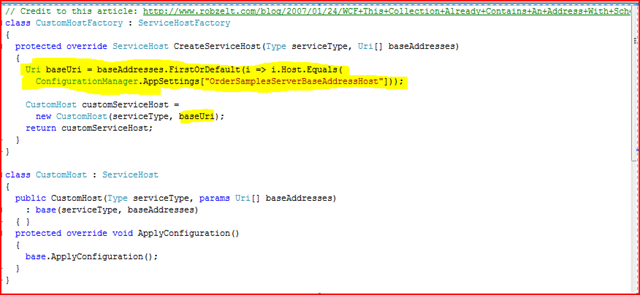
I wrap up my changes, and toss the code onto the client’s server and WCF turns into the devil.  First stop, “WCF: This collection already contains an address with scheme http” message.  One quick hit to Bing Google yields a few hits, including this dude’s solution.  Basically, you have to remember, that WCF is steeped in theory of being agnostic of its host, and as such, when a specific host, like IIS in this case, barfs up several base addresses, WCF doesn’t know what the heck to do.  So, that article’s solution is fine, except, I changed it slightly to have a configurable host name that we look up with a very simple linq-to-object query (I’m sure there are other ways to do this too, so don’t just take these solutions at face-value if you have a larger problem to solve):

image

For my machine, that app setting was the name of my machine, while on the production machine it was something like “foo.com”.  Not pulling ordinally as the article suggests shields from changing host header information in the iis metabase and makes the code more durable.  The next issue was with the client failing with an HTTP 404 (I used the ever-awesome FireFox javascript debugger “Firebug” to look further…highly recommend it).  I decided to make sure I could ping the service.  Yep, no problem.  Then i pinged the service with the /js switch, which the client-side code will use to snag a client-side proxy to talk to the service.  DOH!  No dice.  Hey, this worked on my machine!  30 seconds of googling yields one article describing the issue, and it appears related to Sharepoint being installed, yadda yadda.  At this point, I was essentially eating this time from a client-servicing standpoint after no quick resolution via that article, so I simply pulled down the proxy for my 1-method client wrapper, and replaced my service reference in the script manager with the javascript proxy instead:

<asp:ScriptManager ID=”ScriptManager1″ runat=”server”>
   
<scripts>
       
<asp:ScriptReference Path=”~/OrderSamplesProxy.js” />               
   
</scripts>
</asp:ScriptManager>


I tweaked the output of that proxy javascript to make sure the path to the .svc file was properly relative.  After that, i was good to go.  Not quite ten minutes, but now I’ve taken a few WCF bruises, but the code is better, and the [ajax] world seems right.  Really at some point, i need to circle back and fully address the /js issue.  I was very hesitant to get too experimental since the client’s test server *is* the production server as well, with Sharepoint happily consuming chugging along on it.

Perhaps you’ve encountered such things or may find this useful.

.Net user group meeting notes

Tonight’s .net user group meeting featured Glen Gordon from Microsoft.  He did a presentation on Mix 09 highlights.  The vast majority of information was about Silverlight 3.  Quick rundown:


Silverlight and Blend 3.0 goodness:

  • New functionality to assist with easing effects to provide a more natural look/feel.  You can do this today with Spline KeyFrames in Silverlight 2.0, but this should make such an effect easier to develop.
  • SaveFilterDialog – allows end-users to save files from your SL application.  Your code won’t know where the location because SL lives in the sandbox, and will be provided a [system.io] Stream with which to write (thus still blissfully unaware of the actual physical location).
  • Sketch Flow in Blend is just plain beauty.  In short, this allows designers/developers to “mock” up applications in a way that communicates the non-functional state that an app *should* be in during development.  Under the hood, it can still be real/valid XAML, but the appearance is sort of like hand-writing with regard to look/feel further emphasizing to clients the need to think about the app’s functionality and *not* the font color of a label 😉    .  Additional goodies include end-user feedback ability; users can interactively view the SL mockup using a tool known as the “Sketch Flow Player” and actually submit annotations and feedback).  Sweetness!
  • Behaviors within Blend 3.0 are an extensible way to package up functionality that can be expressed by a designer in Xaml.  Awesome.
  • There is a feature in Blend 3.0 which allows basically mocked up data to show in SL controls within the design experience to see more “life like” representations of the UI.
  • Source Code control in Blend (no brainer here)
  • INTELLISENSE IN BLEND (no more toggling back to VS## for that!)
  • Easier navigation functionality in SL 3.0 for “page to page”.
  • Plenty of other nuggets too (ex: I think much of the controls in the SL toolbox become full citizens of SL 3).


Other notables:

  • Cool info on the Mobile Tagging with Microsoft.  There is a Tag Application named “gettag.mobi” which can read bar-code-looking images containing encoded information.  Ballance downloaded the app onto his IPhone, aimed it at the Tag Glen had on the screen, and voila.  Very cool.  More info
  • Here’s my tag:
    Jason's_tag_2009633133
  • New tool from Microsoft allows comparing pages in different browsers, even if you don’t have those different browser versions locally.  It’s called “Super Preview Test”.  More info
  • .Net RIA services is a technology to assist n-tier development, such as propagating server-side validation to the client, and other goodies like integrating authentication and roles with technologies such as silverlight.  This is not a silverlight-specific technology, and in fact is slated to be useful for ajax development, asp.net, and even within services.
  • Azure came up.  Yeah, Microsoft’s answer to cloud computing.  Not much came out of this one.  Hmmmmm
  • Web Platform installer – This tool simplifies packing up application dependencies into a single package.  More Info
  • Windows 7 releases October 27
  • Silverlight 3.0 should release late summer of this year