KeyTime struct uses implicit operator

This is kinda like one of those times when you purchase a car and “all of a sudden” you notice that car way more on the road.  I was working on a Silverlight code sample, and noticed the System.Windows.Media.Animation.KeyTime struct uses the implicit operator to convert from a TimeSpan struct):

public static implicit operator KeyTime(TimeSpan timeSpan);
 

Fun with implicit operators

You can use the [static] implicit operator feature of C# ([Shared] Widening Operator in VB) to implicitly convert types.  For example, suppose you have this class:

class Foo
{
  public Foo(int age)
  {
    this.Age = age;
  }
}

With the correct implicit operator, you could instantiate the object as so:

Foo foo1 = 35;

So, why would you want to do this?  Well, probably in general, you might be leery (for good reason) of adding “implicitness” to your code, so approach doing so with caution.  It can be confusing to throw something atypical like this in code.  However, a fellow colleague of mine used this feature to effectively mimic subclassing the stringclass in a useful way.  He did this by declaring a simple type containing an implicit operator (taking in the custom type, and returning a string).  That custom type was used as the type for parameters instead of string, and hence the “enforcement” of the “custom string”.  At the point the type needed to be a string, the implicit operator was used, so that an instance could be passed wherever a string was needed as well.  In this case, it was like using a c# const, but the available strings were typed analogous to using an enum for integers.  This example could be taken further by inheriting interfaces and/or additional base classes to have different classes of “typed strings”.

Here’s the compete Foo example followed by the view from Reflector:

namespace ConsoleApplication3
{
  class Program
  {

    static void Main(string[] args)
    {
      Foo foo1 = 35;
      PrintFoo(foo1);
    }

    private static void PrintFoo(int age)
    {
      Console.WriteLine("Foo's age: {0}", age);
    }
  }

  class Foo
  {
    public Foo(int age)
    {
      this.Age = age;
    }
    public int Age { get; set; }

    public static implicit operator Foo(int age)
    {
      return new Foo(age);
    }

    public static implicit operator int(Foo foo)
    {
      return foo.Age;
    }

  }
}

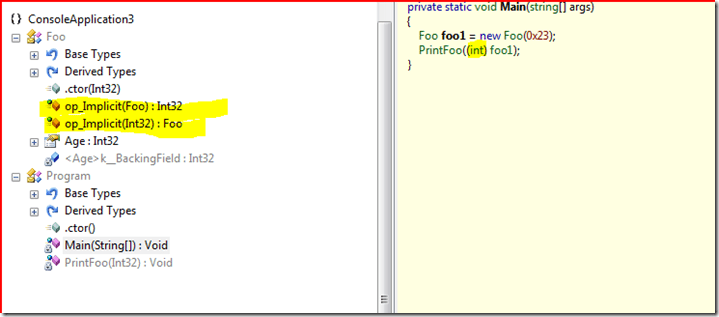
Here’s what it looks like in reflector.  You’ll note the compiler changes to an explicit conversion when calling PrintFoo)
image

Notes from .net developer Group meeting


Tonight the triad developers guild met.  Brian Hitney from Microsoft presented on the “Visual Studio Debugger” and I figured I would not learn to much.  I was wrong; there were a number of great tips I picked up.  Great job Brian!  Brian presented a number of tips, but the *new ones* for me that others might also like to know are..


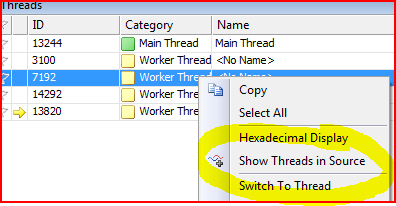
  • For a multi-threaded app, if you have a bunch of threads going, you can freeze them and show where they are in the debugger (outside the thread you are debugging) by checking “Show Threads in Source”. 

    image

  • Tracepoints are like breakpoints but without pausing execution. Nice for quick and dirty (and super temporary) tracing
  • Calling a method from the watch window bypassed breakpoints, while calling from the immediate window honors them
  • You can create compiler-level variables while debugging, and those variables are dereferenced using the pattern $[your variable name here]. 
    • These variables had a wide scope, so you could use them further up in the stack. I could almost see using this to swap out mock objects while debugging a highly sensitive piece of code that is difficult to *get to*
  • You can drag a segment of code into the watch window (I have traditionally used the shift+f9 [quick watch] window for this) to execute
  • You can use the “Make Object Id” command to effectively set a weak reference to a variable, allowing the developer to effectively widen the scope and lifetime.  Combine this with things like GC.GetGeneration(your variable) and you can track an objects generation in the garbage collector.  Kind of an edge case, and if you find yourself doing *that* you might check out a profiler tool instead.  Still, neat.

image

  • Microsoft released much of the .net source code and debug symbols a while back.  You can go into Tools > Options > debugging in visual studio and configure it to allow the developer to step right into .net framework code.
    • There is a tool called “NetMassDownloader” which can preemptively snag all the source, comments, debug symbols ahead of time rather that JIT-downloading it during debugging.
  • Mole for Visual Studio.   Very cool tool and I plan to use ASAP.  This is basically one honking visualizer on steroids.  Cool extra’s like “favorites”.  Great stuff.


Like I said, several great tidbits this evening.  Never fails, and proves the value in engaging in your local .net user groups.

Simplify with Linq

Takes simple tasks and makes them so brutally clean.  Simple examples…

int [] i = { 1, 3, 5, 6,7, 9 };
int  [] i2 = { 2, 4, 5, 8, 10, 3, 5 }; 

 // Combination of all (repeats included).
IEnumerable<int> concat = i.Concat(i2).ToList();

// Only those ints from i not in i2.
IEnumerable<int> except = i.Except(i2).ToList(); 
  // Only the unique ints found in i and i2, and order them.
IEnumerable<int> union = i.Union(i2).OrderBy(r => r).ToList();
  // Only those ints that exist in both i and i2.
IEnumerable<int> intersect = i.Intersect(i2).ToList(); 

linq, auto properties, all the goodies boost productivity

I’m working on a little side-project for a former co-worker.  Its a small project, and I’m working on the back-end using asp.net 3.5.  I don’t know if its Linq, or Linq-to-sql, or the automatic properties, or improved VS productivity tidbits (and enhanced intellisense), but I just find myself moving quickly with great productivity on projects like this. 

Case in point.  I had to snag some data out of the database in a flat manner, and present it in a grouped manner.  Instead of having to group the data up myself, I just used Linq’s GroupBy() support and formed my data into the shape I needed (this was to allow clean data-binding with nested DataLists without going to the db more than once).

Ok, I’m rambling, but while asp.net 3.5 was considerably smaller than 2.0 in size/scope, it just seems to fit right.  So, props to Microsoft.

(Don’t worry, we’ll have more than enough complaints when it comes to other things…. like Moss).

Silverlight worth digging into

I’ve gone through the basic tutorial from “The Gu” and done a little playing around with a few samples from MSDN Magazine.  I snagged another example off MS’s samples site, and after spending an hour or so commenting out and tweaking broken Xaml to get it to run, I realized….uh..time to read up on this subject.

So, I bought this book.  I think my interests are heavier around the deep support for animation and such, but I’d have to get waaaaay stronger in fundamental math concepts; something I’ve been kinda wanting to do anyhow (ex: Trig).  I believe this is where Silverlight (or the “F” word) can add value that is otherwise very tricky to pull off in the web.

We’ll see….